What Should I Prompt for a Good Furniture Image? AI Prompts and Model Selection for Home & Living 2026
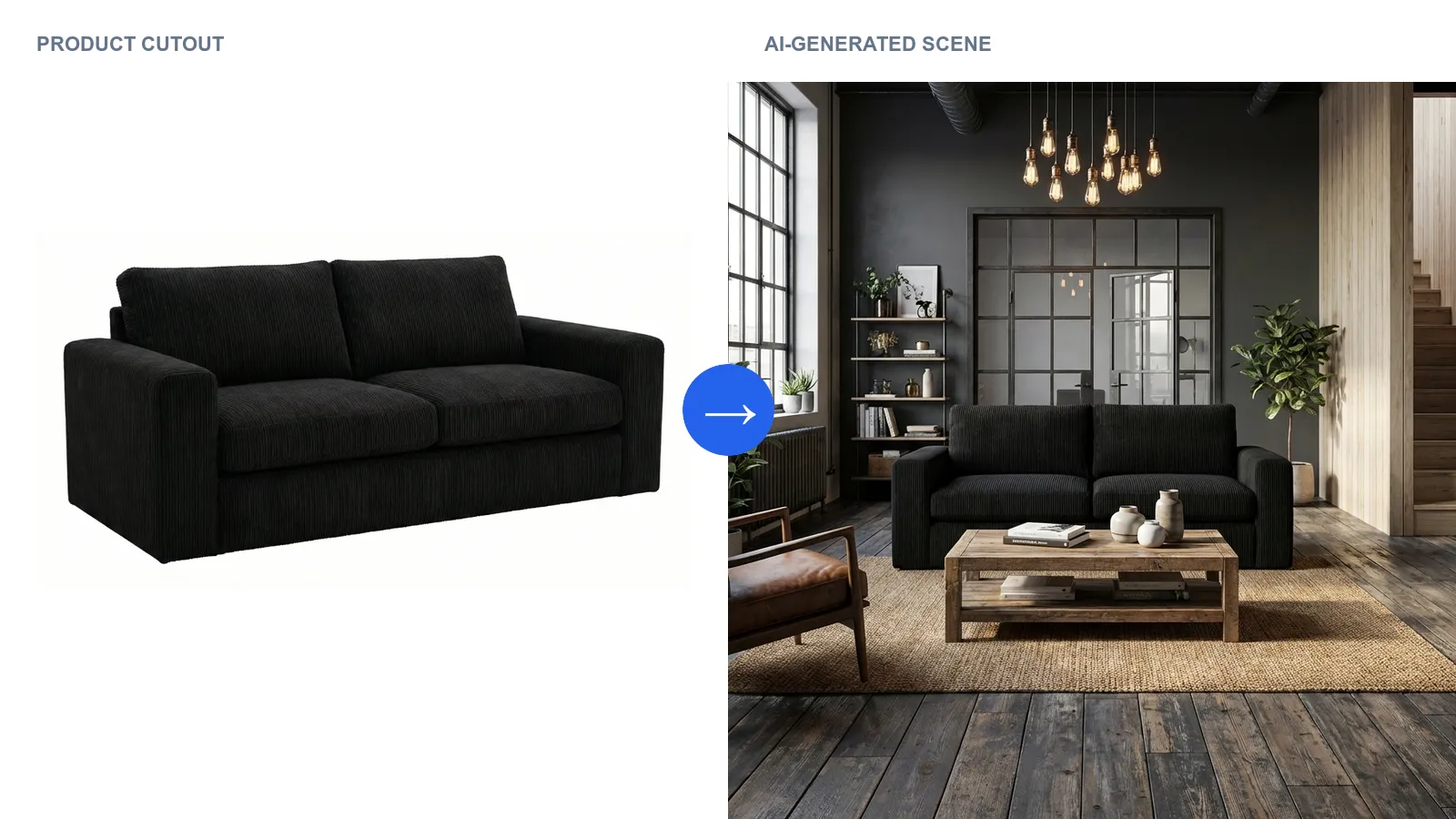
Furniture prompting works differently from creative image prompting. The product already exists - you don’t want it reinvented, you just want it placed in a believable environment. So what actually belongs in a furniture prompt, and what should you leave out? Which model delivers reliable results for Home & Living without failing on scale, material, or product fidelity?
Quick Answers
What should I prompt for a good furniture image?
Room type, interior style, surrounding materials, lighting, decorative companions, framing. You deliberately don’t describe the product itself, because it already exists as input. Keep the prompt compact and use visual anchors instead of subjective adjectives.
Which AI model is best for Home & Living?
Models with licensed training material and a commercial license, such as Google’s Imagen series including Nano Banana Pro, work well for Home & Living. General models like Midjourney fail on product fidelity, scale and material physics. Specialized platforms like showcase curate multiple models specifically for furniture and decor and take the choice off your hands.
Are good prompts enough or do I need more?
For single images, prompts are enough. As soon as you want to serve an entire catalog, multiple marketplace formats, or a consistent brand world, you also need templates, workflow automation, and a model setup curated for the job.
Why furniture prompting follows different rules
Three things set furniture apart from arbitrary image generation. First: product fidelity is mandatory. Every adjective the AI applies to the product can change form, color or material. Second: scale and room logic must hold. A sofa shouldn’t appear smaller than the armchair next to it. Third: material physics is visible. With wood grain, bouclé, leather or high-gloss finishes, buyers spot inaccuracies immediately and lose trust.
That’s exactly why model choice matters at least as much as prompt quality for furniture.
The 7 building blocks of a good furniture prompt
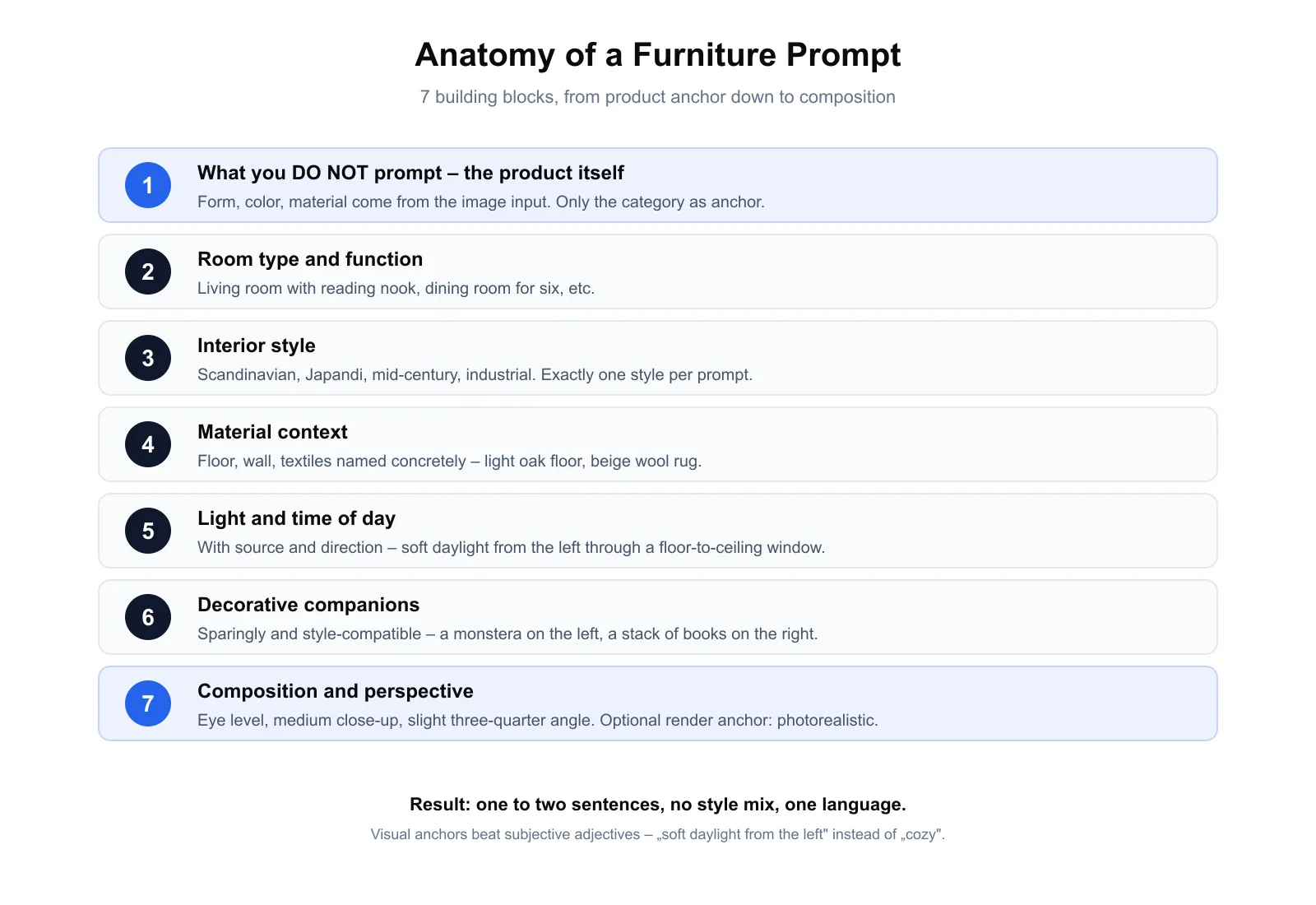
1. What you do NOT prompt. The product itself. Form, color, material come from the image input. At most the category as an anchor, e.g. “sofa” or “dining table”.
2. Room type and function. Not just “living room”, but “living room with reading nook” or “dining room for six”.
3. Interior style. Scandinavian, japandi, mid-century, industrial, mediterranean. Exactly one style per prompt, no mixing.
4. Material context. Name floor, wall, textiles concretely: “light oak plank floor, white plastered wall, beige wool rug”.
5. Light and time of day. With source and direction, not as mood. “Soft daylight from the left through a floor-to-ceiling window” beats “beautiful lighting”.
6. Decorative companions. Sparingly and style-compatible. “A monstera on the left, a stack of books on the right” is enough.
7. Composition and perspective. Eye level, slight three-quarter angle, medium close-up. Optionally a render anchor at the end: “photorealistic”.
Full example: “Sofa, modern living room with reading nook, Scandinavian style, light oak plank floor, white plastered wall, beige wool rug, soft daylight from the left through a floor-to-ceiling window, a monstera on the left, medium close-up, eye level, slight three-quarter angle, photorealistic.”
6 prompting mistakes to avoid
- Describing the product. Sentences like “elegant velvet sofa in dark green” invite the model to work on the product.
- Style mixing in one prompt. “Scandinavian and industrial” produces visual breaks. One style per image.
- Subjective adjectives. “Cozy” and “elegant” have little visual translation. Replace them with light and material anchors.
- Overly long prompts. Three lines per building block sound thorough but weight individual terms more weakly. Aim: one to two sentences.
- Mood instead of light. “Romantic atmosphere” is vague. Light source, direction, hardness and time of day are concrete.
- Mixing languages. “Modern living room with cozy vibe” weakens most models if you are otherwise prompting in another language. Stay in one language.
Example prompts for the most common furniture categories
Four ready-to-use prompts following the seven-building-blocks framework, each under two lines. You can take them one-to-one as a starting point and only adjust style, light or material context to fit your brand.
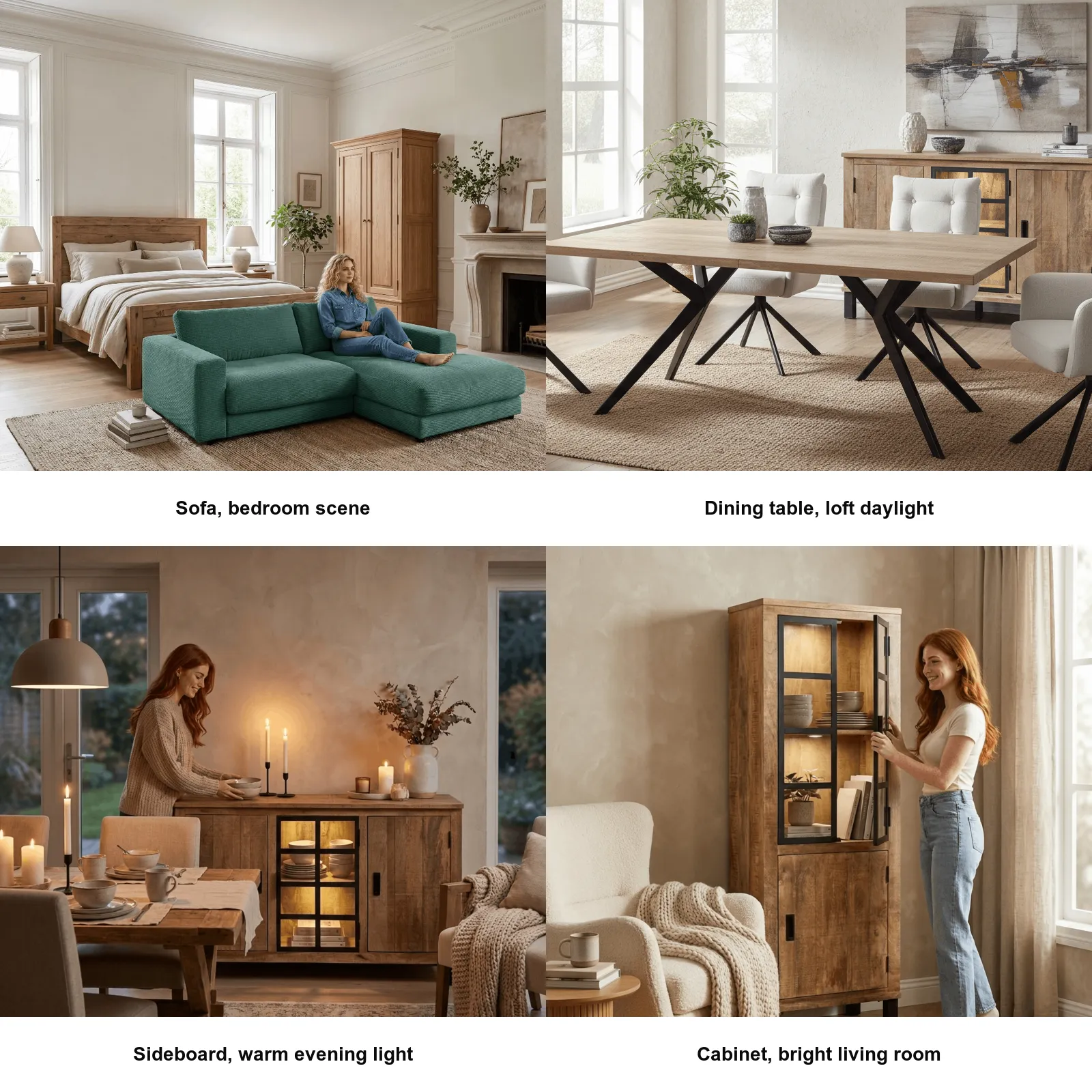
Sofa. “Sofa, modern living room with reading nook, Scandinavian style, light oak plank floor, white plastered wall, beige wool rug, soft daylight from the left, a monstera on the left, medium close-up, eye level, photorealistic.”
Dining table. “Dining table, urban loft, mid-century with industrial accents, dark wood plank floor, exposed concrete wall, six chairs, warm evening light from a pendant lamp, lightly set with plates and wine glasses, slightly elevated perspective, photorealistic.”
Floor lamp. “Floor lamp, reading nook, japandi style, dark oak floor, white wall, next to it an armchair with bouclé upholstery, low side table with an open book, warm lamp light from the floor lamp as the main light source, soft shadows on the wall, medium close-up, frontal, photorealistic.”
Rug. “Rug, spacious living room, mediterranean style, light oak plank floor, modern sofa in the background, walnut coffee table, three plants, white walls, soft midday light, slightly elevated perspective, photorealistic.”
Swap style or light and you have a new variant of the same SKU in seconds.
Model selection for Home & Living: 6 criteria
- Licensed training material for legally safe commercial use in listings and advertising.
- Product fidelity rather than re-generation. Your sofa must stay your sofa.
- Material accuracy for wood grain, fabrics, leather finish, matte and glossy surfaces.
- Scale and room logic. Furniture must fit each other and the room.
- Commercial license with redistribution rights, ideally including paid campaign use.
- Multilingual support. English prompts must work as reliably as your other languages.
Which models work for furniture and which don’t?
| Model family | Examples | Strength | Weakness |
|---|---|---|---|
| Foundation models, licensed | Google’s Imagen series incl. Nano Banana Pro | Photorealism, commercial license, multilingual | No dedicated furniture tuning |
| General AI models | Midjourney, DALL-E, GPT-Image | Creative range | No product fidelity, license questions |
| Open-source models | FLUX, Stable Diffusion 3.5 | Cost-effective, customizable | Setup effort, your own license review |
| Specialized H&L platforms | showcase | Product fidelity, material and room logic, licensed training data, built-in templates and workflows | Lower creative range than general models |
The most important line runs between models that re-generate the product every time, and platforms that take the product from your input and only build the environment around it. For listings, marketplaces and brand campaigns, only the second variant is production-viable. Even a strong foundation model like the Imagen series doesn’t deliver a 100% product-faithful furniture pipeline out of the box - it needs a specialized layer on top that orchestrates multiple models for specific tasks. What happens in that layer concretely?
How specialized platforms combine prompting and models
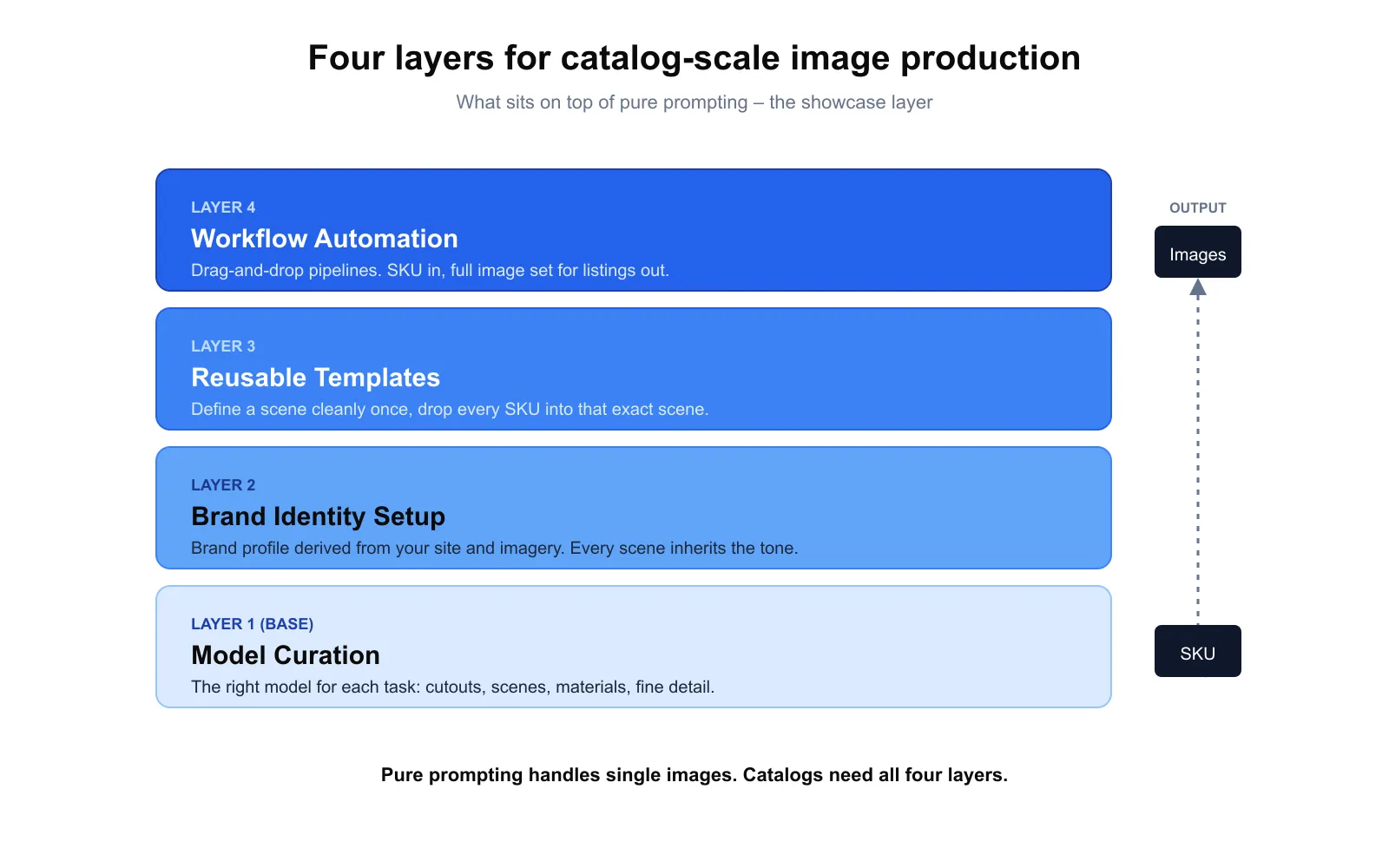
Pure prompting is good for single images. Catalog-scale production needs four layers, all of which showcase handles:
- Model curation. The right model for each task without you having to choose: background removal, scene generation, material or color swaps, detail editing.
- Brand identity setup. showcase analyzes your website and image material once and builds a brand profile from it. Every new scene automatically inherits your tone.
- Reusable templates. Define a scene cleanly once, then drop every SKU into exactly that scene. Prompting becomes catalog-scale image production.
- Workflow automation. Drag-and-drop pipelines. One SKU goes in at the top, the full image set for listings and marketplaces falls out at the bottom.
Limits: what even perfect prompts can’t solve yet
- High-gloss, chrome, glass. Complex reflections are often inconsistent in current models. For high-gloss catalogs, traditional studio photography remains the most honest path for hero shots.
- Very precise material reproduction for specialty fabrics or rare wood species. Specialized models reduce the deviation but don’t eliminate it entirely.
- Configuration and 3D logic. Live swaps of fabric, color, size need real 3D models. AI images are static.
Checklist: are your furniture prompts production-ready?
- You don’t describe the product itself.
- Exactly one interior style per prompt.
- Light specifications with source, direction and time of day.
- Material context concrete and consistent across the catalog.
- Subjective adjectives replaced with visual anchors.
- One language, no mixing.
- Framing and perspective explicit.
- Model or platform delivers product-faithful results for your materials.
FAQ
What separates a good furniture prompt from a bad one?
A good furniture prompt describes the environment precisely and the product not at all. It uses concrete material context and light specifications instead of subjective mood words. Bad prompts describe the product in adjectives and mix styles.
Which AI model is best for furniture images in 2026?
There is no single best model. The Imagen series including Nano Banana Pro is strong on photorealism, multilingual support and commercial licensing, but needs a specialized layer for product fidelity. Platforms like showcase orchestrate multiple models per task.
Are prompts enough or do I need templates?
For single images, prompts are enough. For full catalogs, multiple variants and multiple marketplace formats, you need templates - saved prompt and scene setups that you fill again and again with new SKUs.
Do English prompts work better than other languages?
For many models in 2026 the difference is marginal. What matters more is consistency: a prompt fully in one language almost always beats a mixed-language prompt.
How many tries do I need before a prompt lands?
A prompt following the seven-building-blocks framework delivers a usable result very quickly. Typically the harder challenge is hitting your desired style exactly. If you need more than five tries, it’s rarely the model - it’s almost always an anti-pattern. Most common causes: style mixing, describing the product, overly long prompts.
Conclusion
Good AI furniture images come from precise prompts and a model setup tuned for Home & Living. The seven prompt building blocks, the six anti-patterns, and the six model criteria are the toolkit. As soon as the requirements grow - catalog consistency, multiple marketplace formats, a coherent brand world - the prompt logic gets joined by the layer of model curation, brand setup, templates and workflow automation.
Further reading:
- Photorealistic Lifestyle Images with AI
- AI vs. CGI for Product Images: When to Switch in 2026
- AI Photo Studio for Lifestyle Images and Color Variants
- AI Product Images in eCommerce: Legal Guide 2026
showcase is an AI platform for Home & Living product photography. From simple product images, photorealistic furniture images, lifestyle scenes and room worlds are created in seconds, with curated model selection, brand-faithful templates and automated workflows. Try it free, no credit card required →
About the author

Author
Tim Hoffmann
Chief Product Officer, getshowcase.ai
Tim Hoffmann leads the product strategy for the AI image studio at showcase (getshowcase.ai). He brings years of e-commerce experience in product data, marketplace integrations, and visual content creation. His focus: helping Home & Living retailers turn product cutouts into photorealistic lifestyle images and room scenes in minutes - without expensive shoots, with measurably better conversion. Tim shares practical strategies for product images that perform on marketplaces and in your own shop.